
GPT Image 2 - Next-Gen AI Image Generator
GPT Image 2 is a multi-mode visual engine: create from text or work image-to-image with context-aware quality. Get photorealistic 4K output, legible multi-language text in frame, and production-ready results without a heavy desktop pipeline.
Text-to-image and image-to-image in one workflow
Transform your image with AI-powered editing
Click to use prompt
Please sign in to purchase credits
0 / 16 images
Supported formats: JPEG, PNG, WEBP. Maximum file size: 30MB. Maximum files: 16.
Your ultra-fast AI creations appear here instantly
Example Prompt 1/2
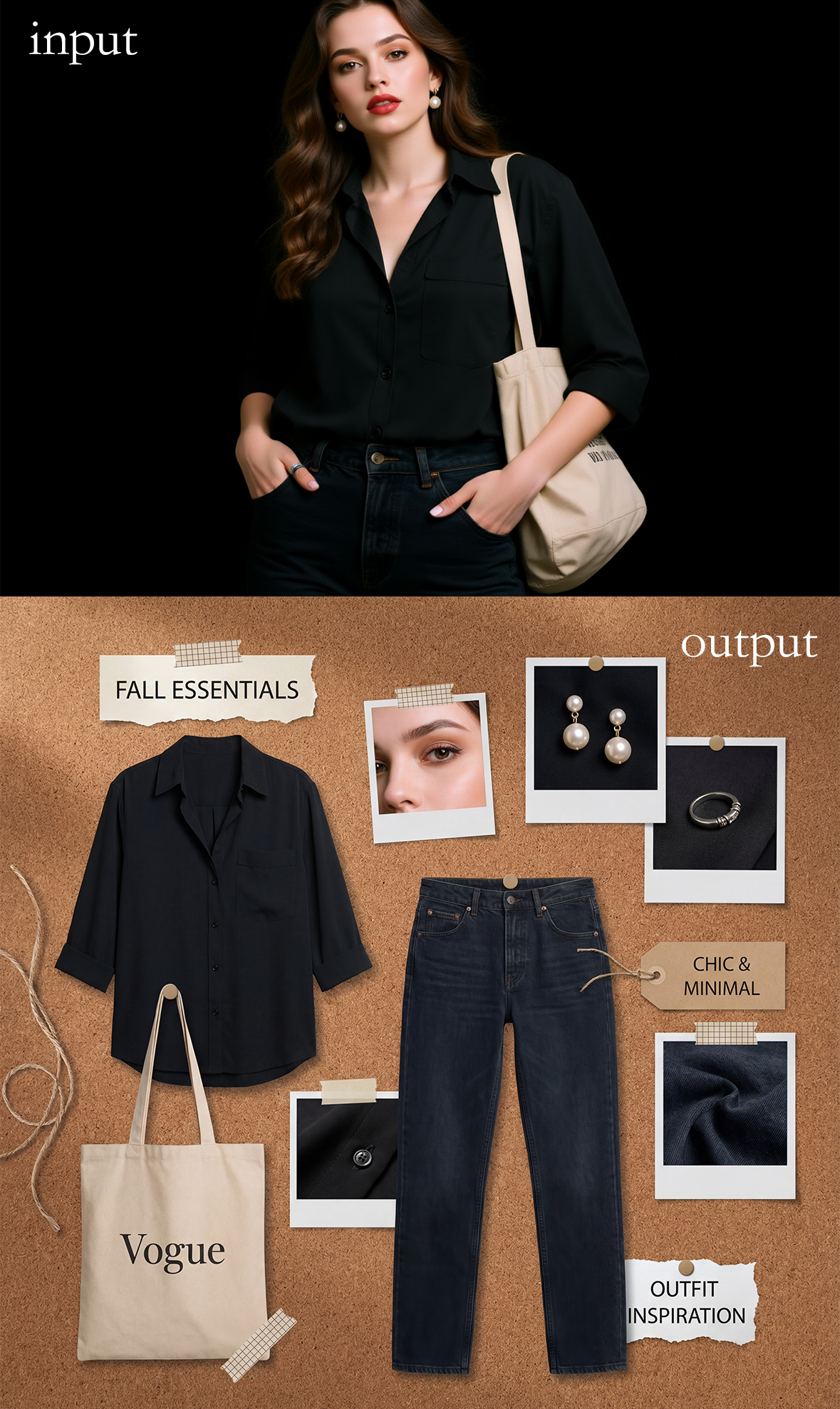
"Based on this outfit, create a fashion product collage on a brown corkboard"
What is GPT Image 2
GPT Image 2 is built for modern creative workflows. It is a next-generation model that fuses strong prompt understanding with crisp typography and high-resolution rendering—so posters, product shots, and concept art all stay coherent from first pass to final export.
Multi-Mode by Design
Start from a detailed text prompt or bring reference images for edits, style direction, and guided variations. GPT Image 2 supports both text-to-image and image-to-image in a unified experience.
Context-Aware Scenes
The engine reasons about lighting, materials, and layout together—so backgrounds, subject placement, and readable lettering stay consistent instead of looking pasted together.
4K-Ready Fidelity
Aim for sharp, high-resolution output suitable for web, print mocks, and marketing: crisp edges, natural texture, and controlled contrast when you need a polished, production look.
How to Use GPT Image 2
Get from idea to export in three simple steps—whether you are iterating on a campaign visual or exploring art directions.
1 · Describe or Upload
Type your creative brief with style, subject, and aspect ratio, or add reference images to steer composition and look.
2 · Let the Engine Synthesize
GPT Image 2 processes your instruction with strong prompt following—balancing lighting, materials, and text placement in one coherent render.
3 · Export the Result
Review the image, then download a high-quality file for your channel: social, ads, decks, or portfolio—without round-tripping through endless touch-up tools.
Key Features of GPT Image 2
The capabilities that set GPT Image 2 apart for designers and marketers who are tired of blurry type and incoherent scenes.
Flawless Text in Images
Render legible typography for posters, UI mocks, and packaging—across multiple languages when your brief demands global-ready artwork.
Hyperrealistic Visuals
Surface detail that reads on large canvases: skin, fabric, reflections, and environmental depth without the “plastic” look of older generators.
Multi-Mode Creation
Blend pure generation with reference-driven edits: style transfer, guided iterations, and flexible image-to-image workflows in one place.
Faster Iteration Cycles
Move from concept to comp quickly—so your team spends time on message and brand fit instead of fighting artifacts.
Prompt-Forward Control
Describe scene structure and mood in natural language; the model prioritizes what you said about layout, not just a vague “vibe.”
Cloud Workflow
No local GPU farm required. Run GPT Image 2 from your browser and keep creative momentum wherever you work.
Why Teams Choose GPT Image 2
When legacy pipelines still deliver scrambled letters or mushy detail, GPT Image 2 is built to reduce rework—clear type, solid materials, and predictable composition.
Output Focus
4K
High-Resolution
Text & Layout
Sharp
Readable Type
Modes
2-in-1
Text + Image In
Plans & Pricing of Nano Banana
Unlimited creativity starts here
Perfect for individuals and light users
$0.02 per credit
- 3,000 credits/year
- Annual exclusive: Nano Banana Lite Unlimited Use
- ≈1,000 Nano Banana images
- ≈600 Nano Banana 2 images
- ≈600 GPT Image 2 images
- ≈300 Nano Banana Pro images
- All style templates included
- Standard generation speed
- Basic customer support
For professional creators and teams
$0.01 per credit
- 12,000 credits/year
- Annual exclusive: Nano Banana Lite Unlimited Use
- ≈4,000 Nano Banana images
- ≈2,400 Nano Banana 2 images
- ≈2,400 GPT Image 2 images
- ≈1,200 Nano Banana Pro images
- All style templates included
- Priority generation queue
- Priority customer support
- Batch generation feature
Designed for large enterprises
$0.01 per credit
- 45,000 credits/year
- Annual exclusive: Nano Banana Lite Unlimited Use
- ≈15,000 Nano Banana images
- ≈9,000 Nano Banana 2 images
- ≈9,000 GPT Image 2 images
- ≈4,500 Nano Banana Pro images
- All style templates included
- Fastest generation speed
- Dedicated account manager
- Batch generation feature
FAQs About GPT Image 2
Common questions about multi-mode generation, text quality, resolution, and how GPT Image 2 fits into real production work.
What makes GPT Image 2 different from older generators?
It emphasizes coherent scenes and legible lettering in one pass—so you are not stuck fixing warped type or muddled backgrounds in post. That matters for real marketing and design deliverables, not just pretty thumbnails.
Does GPT Image 2 support text-to-image and image-to-image?
Yes. You can generate from scratch with a prompt or bring reference material for guided edits, style control, and iteration—so one workflow covers concepting and refinements.
Can I get strong typography and multi-language text in images?
GPT Image 2 is designed with typography in mind. Use it for posters, packaging, and social graphics where the words must be readable, not just decorative shapes.
Is GPT Image 2 suitable for complex prompts and varied styles?
The model is built for precise prompt following across styles—from product and studio looks to stylized or cinematic art—while keeping physical consistency in materials and light.
Do I need expensive local hardware?
No. The heavy compute runs in the cloud. You work through a web workflow and download results when you are happy with the comp.
What should I do if traditional tools feel too slow to iterate?
Start with a tight brief in GPT Image 2, generate a few strong directions, then refine with image-to-image. That cuts the back-and-forth you get when every small change requires a full manual comp.
Try GPT Image 2 Today
Experience next-generation image generation: sharp text, rich materials, and flexible text-to-image and image-to-image creation in one place.