
Drag or upload images (0/1)
Support jpg, jpeg, png, webp, up to 16MB
AI Image Upscaler
From old family photos to product shots — upscale any image to crystal-clear 4K in seconds.
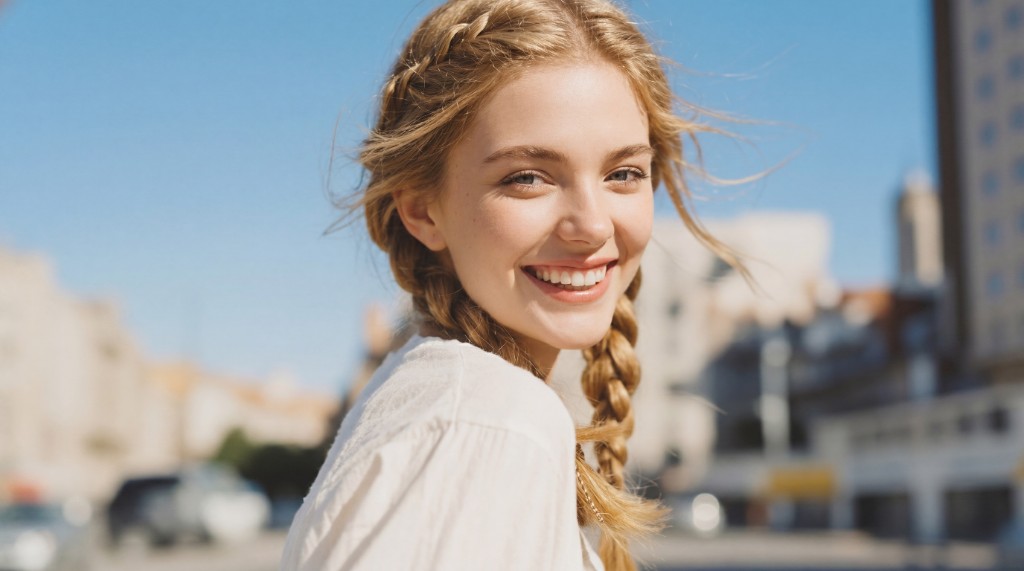
AI Image Upscaler — Crystal-Clear Results in Seconds
Enhance any photo to stunning 4K quality with our AI Image Upscaler. Recover fine details, sharpen textures, and export at 2x, 4x, or 6x resolution — powered by Nano Banana 2.
Upload your ImageWhat is AI Image Upscaler?
AI Image Upscaler is an online tool that uses advanced AI to enlarge photos while preserving sharpness and detail. It's perfect for enhancing low-resolution images, restoring old photos, or preparing visuals for large-format printing and professional display.
LOW RES4K UPSCALEDWhy Choose AI Image Upscaler?
AI Image Upscaler delivers superior results compared to traditional resizing methods. It intelligently reconstructs missing pixels, sharpens edges, and enhances textures — giving your photos professional-grade clarity without any manual editing skills required.
BLURRYThe Struggle of Low-Resolution Images
Blurry, pixelated images ruin professional presentations, product listings, and print materials. Traditional upscaling tools simply stretch pixels, resulting in soft, unrealistic photos. AI Image Upscaler solves this by using deep learning to add genuine detail and clarity.
What Are the Key Features of AI Image Upscaler?
AI Image Upscaler delivers razor-sharp enlargements at 2x, 4x, or 6x. The AI intelligently fills in detail so your upscaled image looks naturally high-resolution.
2x, 4x, and 6x Upscaling Without Blurring
Choose your preferred scale factor and let the AI handle the rest. Unlike basic interpolation, the model adds authentic texture and sharpness so the result looks naturally high-resolution.
Advanced AI for Fine Detail and Edge Reconstruction
Powered by state-of-the-art super-resolution models, AI Image Upscaler recovers hair strands, fabric textures, architectural lines, and facial features with pixel-level precision.
Simple One-Click Workflow for Instant Results
Upload your image, select the upscale factor, and click Generate. No complicated software or settings needed. Each upscale uses a small number of credits and completes in seconds.
How to Use AI Image Upscaler in Three Simple Steps
Upscaling your photos is effortless with AI Image Upscaler. Follow three quick steps to get crisp, high-resolution results.
Upscale Images in One Click
Step 1 – Upload the Image You Want to Enhance
Select and upload any photo from your device. JPG, PNG, and WebP formats are supported up to 16MB. The tool prepares your image for AI processing without reducing original quality.
Step 2 – Choose Your Upscale Factor
Select 2x, 4x, or 6x enlargement depending on your needs. The AI analyzes the image structure and reconstructs fine details at the chosen resolution before processing begins.
Step 3 – Download Your High-Resolution Image
In seconds, your upscaled image is ready to preview and download. Compare the before-and-after result and export the high-resolution file for print, web, or professional use.
Ready to Enhance Your Photos Instantly?
Start using AI Image Upscaler now to transform blurry, low-resolution photos into sharp, professional-quality images. Just upload your photo and watch the AI do the work.
Try AI Image Upscaler NowWhat Users Say About AI Image Upscaler

J.S.
Product Photographer
"AI Image Upscaler has completely changed how I prepare product photos. I can now take a decent photo and upscale it to 4K in seconds. The detail recovery is incredible — textures look natural and sharp, not artificially smoothed. It's become an essential part of my workflow."

M.T.
Graphic Designer
"As a designer, I often receive low-res logos or images from clients. AI Image Upscaler recovers the sharpness I need for large-format print jobs. The edge reconstruction is impressive — even at 6x, the results look clean and professional without any pixelation."

L.R.
Social Media Manager
"Getting high-quality visuals for campaigns used to require expensive photographers. Now I can upscale stock photos or screenshots instantly with AI Image Upscaler. The quality improvement is remarkable and it saves us a lot of production time every week."

K.H.
Archival Specialist
"I work with historical photographs that are often low-resolution scans. AI Image Upscaler restores incredible detail to these old images. The AI doesn't just enlarge — it genuinely enhances. It's the best tool I've found for digital preservation projects."

A.W.
E-commerce Seller
"Product listings need high-resolution images to convert visitors. AI Image Upscaler lets me take photos on my phone and upscale them to professional quality in seconds. My click-through rates improved noticeably after switching to upscaled product images."

S.F.
Content Creator
"I use AI Image Upscaler for thumbnails and cover images. The 4x mode gives me crisp, sharp visuals that look great on every screen size. The process is fast and the quality is consistently excellent — I recommend it to every content creator I know."
Frequently Asked Questions About AI Image Upscaler
What is AI Image Upscaler and how does it work?⌄
AI Image Upscaler uses deep learning super-resolution models to enlarge your photos while recovering fine details. Simply upload an image, select your scale factor (2x, 4x, or 6x), click Generate, and the AI delivers a high-resolution result in seconds.
How does the credit system work for AI Image Upscaler?⌄
Each upscale uses credits from your account. The exact cost depends on the scale factor selected. Credits can be purchased in the billing section of your dashboard.
What upscale factors are supported?⌄
AI Image Upscaler supports 2x, 4x, and 6x enlargement. Choose based on your needs: 2x for moderate enhancement, 4x for high-quality enlargements, and 6x for maximum resolution output.
How long does AI Image Upscaler take to process a photo?⌄
Most images are upscaled within 10–30 seconds depending on image size and the chosen scale factor. Larger images at 6x may take slightly longer.
What image formats does AI Image Upscaler support?⌄
JPG, JPEG, PNG, and WEBP files up to 16MB are supported for upload. The result is exported as a high-quality PNG or JPG file.
Will AI Image Upscaler make my image look artificial or over-sharpened?⌄
No. The AI uses trained super-resolution models that reconstruct realistic textures and natural edges. Results look genuinely high-resolution rather than artificially processed.
Is an account required to use AI Image Upscaler?⌄
You need an account to generate upscaled images and use credits. You can preview the demo comparison slider without logging in.
Can I upscale multiple images at once?⌄
Currently, the tool processes one image per generation. Each upscale uses credits based on the selected scale factor.
Is AI Image Upscaler suitable for professional printing?⌄
Yes. The upscaled output is suitable for professional print materials, large-format displays, and high-resolution digital publishing. The AI preserves fine detail at every scale factor.
What types of images benefit most from AI upscaling?⌄
Portraits, product photos, landscapes, and archival scans all benefit significantly. The AI excels at recovering hair detail, skin texture, fabric patterns, and architectural lines.